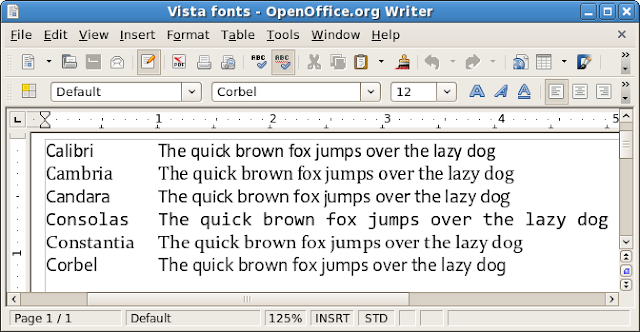
Windows Vista and Microsoft Office 2007 introduce the new ClearType Collection typefaces: Calibri, Cambria, Candara, Consolas, Constantia, and Corbel. They replace the classics Times New Roman, Arial, Courier New, etc. When passing documents between systems, it's necessary to have the same: otherwise, documents look and layout may suffer. If you get an Office Open XML .docx or .pptx, chances are you need these new fonts, but OpenOffice.org, Linux, and Windows XP users need not be left out in the cold. Until Red Hat creates new metrically equivalent fonts (as it did for the older Microsoft fonts), it's easy to install these new Microsoft fonts without Vista or Office.
License
Please read the PowerPoint Viewer download page which includes this statement:
You may use the fonts that accompany the PowerPoint Viewer only to display and print content from a device running a Microsoft Windows operating system.
I am not a lawyer, but I wonder whether having Windows in dual boot or virtualization satisfies this requirement. If you want a free-as-in-speech alternative, use font replacement.
Method 1: Windows only
Just download and install PowerPoint Viewer 2007. Alternatively, you could use the Microsoft Office Compatibility Pack, but a much larger download. Both downloads are free and neither require Windows Genuine Advantage validation.
Method 2: cabextract (Linux only)
- Install cabextract. On Fedora, simply run this command:
sudo yum -y install cabextractOn Ubuntu run:sudo apt-get install cabextract - Download PowerPoint Viewer 2007.
- Extract the .exe:
cabextract -F ppviewer.cab PowerPointViewer.exe - Prepare a separate target installation directory:
sudo mkdir /usr/share/fonts/vista - Extract the actual fonts:
sudo cabextract -F '*.TT?' -d /usr/share/fonts/vista ppviewer.cab
Tip: You may substitute ~/.fonts instead of /usr/share/fonts for local, single-user installation which does not require root access. - Update the cache:
fc-cache -fv
Method 3: Wine (Linux only)
- Install Wine. On Fedora, simply run:
sudo yum -y install wineOn Ubuntu, run:sudo apt-get install wine - Download PowerPoint Viewer 2007.
- Install the viewer by running:
wine PowerPointViewer.exe - Install the fonts by moving them like so:
sudo mkdir /usr/share/fonts/vistaTip: You may substitute ~/.fonts instead of /usr/share/fonts for local, single-user installation which does not require root access.
cd ~/.wine/drive_c/windows/fonts/
sudo mv {CALIBR,CAMBRIA,CANDARA,CONSOLA,CONSTAN,CORBEL}*.TT? \
/usr/share/fonts/vista - Update the cache:
fc-cache -fv
Testing and comparison
Once the fonts are installed, refresh this page. Exiting the browser first may be necessary. Then, you should see the fonts change below.
Did you know that OpenOffice.org installs the Bitstream fonts?
| Windows Vista / Office 2007 | Windows 95-XP era | OpenOffice.org |
|---|---|---|
| Calibri | Arial Arial Black | Bitstream Vera Sans |
| Cambria | Times New Roman Georgia Impact | Bitstream Vera Serif |
| Candara | Trebuchet MS | |
| Consolas | Lucida Console Courier New | Bitstream Vera Mono |
| Constantia | Book Antiqua Palatino Linotype Tahoma | |
| Corbel | Verdana |


No hay comentarios:
Publicar un comentario